This was my fourth guest post here for the Knowledge Tester's blog. It was written in response to a well known security bug Heartbleed found in the OpenSSL. This post was also placed among the five best blogs on 5Blogs. It was published on April 21, 2014. Here is a copy of the full post from Knowledge Tester's site.


What is SSL?
The Secure Sockets Layer (SSL) is a commonly used protocol for managing the security of a message transmission on the Internet. It ensures privacy between communicating applications and their users on the Internet through the use of cryptography and encryption. SSL has recently been succeeded by Transport Layer Security (TLS), which is based on SSL. TLS and SSL are an integral part of most Web browsers (clients) and Web servers.

FoxBleed – A Firefox add-on, developed by Fabian Bräunlein, which can help a user identify all vulnerable websites he is visiting and notify whether they are affected by the Heartbleed vulnerability.


(This is a post by Huma *)
Many of you have already heard about the Heartbleed bug, but like many others into testing, this news seized my attention and I wanted to talk about it. This bug has not only questioned our assumptions about a secure Internet, but also put the chaotic nature of the Internet under the magnifying glass. Almost every one of us uses Internet for services like emails, instant messaging, banking, shopping or social media and Heartbleed bug has impacted many of the widely used websites. Here is a little overview of that ugly vulnerability which has been recently discovered in the OpenSSL library, how to find out if you are impacted, a possible cure and what lessons can we learn from this bug?

What is SSL?
The Secure Sockets Layer (SSL) is a commonly used protocol for managing the security of a message transmission on the Internet. It ensures privacy between communicating applications and their users on the Internet through the use of cryptography and encryption. SSL has recently been succeeded by Transport Layer Security (TLS), which is based on SSL. TLS and SSL are an integral part of most Web browsers (clients) and Web servers.
What is OpenSSL?
OpenSSL is an open-source implementation of the SSL and TLS protocols. It is a toolkit implementing the basic cryptographic and utility functions, written in C programming language. Being an open-source project, it is managed by a worldwide community of volunteers. This is responsible for putting the S in HTTPS (formally HTTP). Some of the popular companies, which use OpenSSL, are Google, Yahoo, Instagram, GoDaddy, Etsy, Pintrest, Flicker, Netflix, YouTube, Dropbox, GitHub and Wikipedia.
OpenSSL is an open-source implementation of the SSL and TLS protocols. It is a toolkit implementing the basic cryptographic and utility functions, written in C programming language. Being an open-source project, it is managed by a worldwide community of volunteers. This is responsible for putting the S in HTTPS (formally HTTP). Some of the popular companies, which use OpenSSL, are Google, Yahoo, Instagram, GoDaddy, Etsy, Pintrest, Flicker, Netflix, YouTube, Dropbox, GitHub and Wikipedia.
What is the Heartbleed Bug?
The Heartbleed bug is a serious vulnerability in the popular OpenSSL cryptographic software library. This bug allows stealing the information protected, under normal conditions, by the SSL/TLS encryption, according to heartbleed.com. Google’s security team and Codenomicon (a software security firm) discovered this bug independently. It is said that Google’s security team found the bug while auditing for the third-party applications being used by the Google, and Codenomicon unrevealed it while attacking their own website with an exploit code to uncover any security vulnerabilities in case of a hacking attempt. Both companies found that a little glitch in the OpenSSL implementation made it possible to access secure data existing on a web-server using OpenSSL, which includes critical information like usernames, passwords, encryption keys and certificates. According to Security Intelligence Blog, when exploited on a vulnerable server, it can allow an attacker to read a portion — up to 64 KB worth— of the computer’s memory at a time, without leaving any traces. A large number of websites were reported to be affected by the Heartbleed bug. Among these, there were big and popular names like Google, Twitter, Flicker, GoDaddy, Netflix and Instagram. Many of these websites are now patched. Mobile applications using OpenSSL are also affected. CVE-2014-0160 is the official reference to this bug.
The Heartbleed bug is a serious vulnerability in the popular OpenSSL cryptographic software library. This bug allows stealing the information protected, under normal conditions, by the SSL/TLS encryption, according to heartbleed.com. Google’s security team and Codenomicon (a software security firm) discovered this bug independently. It is said that Google’s security team found the bug while auditing for the third-party applications being used by the Google, and Codenomicon unrevealed it while attacking their own website with an exploit code to uncover any security vulnerabilities in case of a hacking attempt. Both companies found that a little glitch in the OpenSSL implementation made it possible to access secure data existing on a web-server using OpenSSL, which includes critical information like usernames, passwords, encryption keys and certificates. According to Security Intelligence Blog, when exploited on a vulnerable server, it can allow an attacker to read a portion — up to 64 KB worth— of the computer’s memory at a time, without leaving any traces. A large number of websites were reported to be affected by the Heartbleed bug. Among these, there were big and popular names like Google, Twitter, Flicker, GoDaddy, Netflix and Instagram. Many of these websites are now patched. Mobile applications using OpenSSL are also affected. CVE-2014-0160 is the official reference to this bug.
How the Heartbleed Bug Works?
What is said to be a programming mistake and not a design flaw was introduced in February 2012 through Heartbeat Extension (RFC6520 standard) for the TLS and Datagram Transport Layer security (DTLS) protocols. This also explains the name Heartbleed, a bug which is result of the Heartbeat extension and bleeding out important information from the memory. The mentioned bug affects OpenSSL version 1.0.1 and 1.0.2-beta releases. Technically talking, TLS heartbeats are actually the “keep alive” packets between communicating parties to keep the session open even when they don’t have any official data to exchange. Both sender and receiver share heartbeats, which consist of a reply and a matching response. In the Heartbleed bug, while sending a request, a sender is able to not only send valid data (later used to confirm the response) but also requests extra information to be sent as part of the response. In response, a Heartbleed affected server not only sent the matching response shared earlier by the sender, but also runs off the end of its data and scoops up whatever else is next to it in memory and could fit in the response message, without ensuring if sender is authorized to see that data or not. This data leakage may include information like user credentials, credit card information, confidential documents, session keys, encryption keys and much more. You can read more about the code for request and response messages looks like here. The simplest explanation of the Hearbleed bug is presented by a web comic at http://xkcd.com/.
What is said to be a programming mistake and not a design flaw was introduced in February 2012 through Heartbeat Extension (RFC6520 standard) for the TLS and Datagram Transport Layer security (DTLS) protocols. This also explains the name Heartbleed, a bug which is result of the Heartbeat extension and bleeding out important information from the memory. The mentioned bug affects OpenSSL version 1.0.1 and 1.0.2-beta releases. Technically talking, TLS heartbeats are actually the “keep alive” packets between communicating parties to keep the session open even when they don’t have any official data to exchange. Both sender and receiver share heartbeats, which consist of a reply and a matching response. In the Heartbleed bug, while sending a request, a sender is able to not only send valid data (later used to confirm the response) but also requests extra information to be sent as part of the response. In response, a Heartbleed affected server not only sent the matching response shared earlier by the sender, but also runs off the end of its data and scoops up whatever else is next to it in memory and could fit in the response message, without ensuring if sender is authorized to see that data or not. This data leakage may include information like user credentials, credit card information, confidential documents, session keys, encryption keys and much more. You can read more about the code for request and response messages looks like here. The simplest explanation of the Hearbleed bug is presented by a web comic at http://xkcd.com/.
How to check for the Heartbleed bug?
There is already a patch out, which has fixed this bug. Most websites have already upgraded to the latest patch. Administrators of the impacted web-servers also need to upgrade to the latest fixed patch. There are following ways, which can help users to find if a web site is still vulnerable to the Heartbleed bug or not.
There is already a patch out, which has fixed this bug. Most websites have already upgraded to the latest patch. Administrators of the impacted web-servers also need to upgrade to the latest fixed patch. There are following ways, which can help users to find if a web site is still vulnerable to the Heartbleed bug or not.
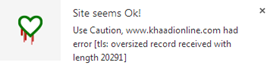
Chromebleed – A Google Chrome’s add-in originally developed by Jamie Hoyle that uses a web service created by Filippo Valsorda to checks if the URL of the page you have just loaded is affected by Heartbleed. If Heartbleed vulnerability is found then a Chrome notification is displayed to the user.

FoxBleed – A Firefox add-on, developed by Fabian Bräunlein, which can help a user identify all vulnerable websites he is visiting and notify whether they are affected by the Heartbleed vulnerability.

Heartbleed Security Scanner (Mobile) – A security scanner for Android devices, which helps detect whether a device is affected by the Heartbleed bug in OpenSSL and whether the vulnerable behavior is enabled. It is developed by Lookout, a mobile security company.
Heartbleed Cure?
So far, the best you could do as a user of any impacted website, is to check if the website got affected or not. Let your service provider know about possible vulnerability and ask them to upgrade to the latest code patch. Once, they upgrade, go ahead and change your user credentials.
So far, the best you could do as a user of any impacted website, is to check if the website got affected or not. Let your service provider know about possible vulnerability and ask them to upgrade to the latest code patch. Once, they upgrade, go ahead and change your user credentials.
I tried this for the following and here are two different results that you may get:

Lesson Learned
In the Heartbleed bug, there are many lessons to be learnt. From development and testing point of view, the biggest lesson learnt is “never let your guard down against the data you are receiving”. Also, “always double-check the inputs before giving it control of your application”, and “always look for data leakage bugs and never ignore buffer overflows”. A while back, I shared a post on Data Tampering, where I discussed the way user inputs can be tampered to test the vulnerabilities associated with invalid input data. Also, the bug raised questions about the credibility of open source tools. The open source applications have made great contributions for the software community, however there is a need to put in place more reliable practices of software development to avoid such bugs making their way to the released code. It is very important to review the ways in which the open source code is developed, tested and maintained before publishing to be used by the public. It also requires better and more effective processes to be followed by the companies using the open source code, by conducting frequent code reviews to uncover such vulnerabilities before they hurt. We may not be able to fully eliminate the bugs, but we can at least try to minimize their chances of being uncaught.
In the Heartbleed bug, there are many lessons to be learnt. From development and testing point of view, the biggest lesson learnt is “never let your guard down against the data you are receiving”. Also, “always double-check the inputs before giving it control of your application”, and “always look for data leakage bugs and never ignore buffer overflows”. A while back, I shared a post on Data Tampering, where I discussed the way user inputs can be tampered to test the vulnerabilities associated with invalid input data. Also, the bug raised questions about the credibility of open source tools. The open source applications have made great contributions for the software community, however there is a need to put in place more reliable practices of software development to avoid such bugs making their way to the released code. It is very important to review the ways in which the open source code is developed, tested and maintained before publishing to be used by the public. It also requires better and more effective processes to be followed by the companies using the open source code, by conducting frequent code reviews to uncover such vulnerabilities before they hurt. We may not be able to fully eliminate the bugs, but we can at least try to minimize their chances of being uncaught.
What are your thoughts on the lessons learned?
* Huma Hamid has been a regular contributor to KnowledgeTester.org, so I am taking the word ‘guest’ out of this post. Her previous thoughts were about Good Testers, Data Tempering andWasted time. She not only has an excellent systems view of the things but also digs into details when needed. Thanks for your thoughts Huma and I hope that Knowledge Testers would like this post.




 Posts
Posts

